STUDIO · DRUM PROGRAMMING
Make Programmed Drums Feel Played
Velocity layers, round robin, articulation and timing solve different problems. Separate their jobs before reaching for a broad humanize control.

A sampled snare can change volume without changing character. It can change character without moving off the beat. It can arrive later without becoming a rimshot. When those differences are collapsed into one instruction—“make it more human”—the result often becomes random rather than expressive.
Start with the role of the kit. A rigid electronic pulse may be exactly what a chorus needs; an acoustic-style verse might benefit from quieter connecting strokes and more varied repeated hits. The aim is not to disguise every programmed note. It is to make the part express a clear performance idea.
Velocity layers
May call up recordings played at different strengths.
Round robin
Selects among alternate takes of a repeated sound.
Articulation
Changes the kind of stroke: centre, rimshot, sidestick or hat opening.
Timing
Changes when the chosen hit begins against the rest of the song.
Give velocity a musical job
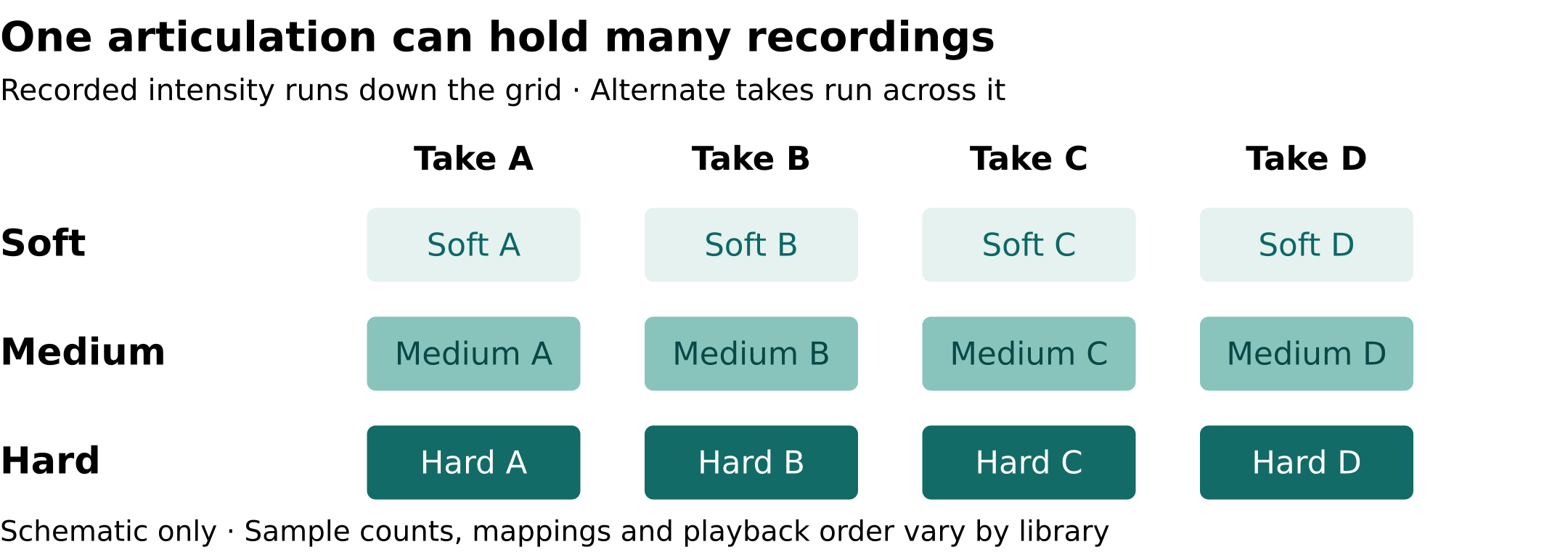
A velocity layer is a recording made at a particular playing intensity and mapped to a range of incoming note velocities. With several layers, a softer MIDI note can call up a gentler recorded stroke rather than simply turn down a hard hit. The exact response depends on the instrument and its mapping.
Native Instruments’ Abbey Road 60s Drums manual keeps volume, velocity and timing randomization separate. Its velocity control can select a different sample above or below the original note’s velocity; its volume control changes level. That product-specific example illustrates a broader distinction worth checking in any drum instrument.
For a verse, decide which strokes carry the rhythm. Keep the main snare backbeats clear, then lower the connecting ghost notes. Audition the transition between them. If every soft ghost still sounds like a distant copy of the same aggressive hit, inspect the patch’s velocity response before adding more randomization.
Let repeated hits change takes
Round robin selects among alternate recordings of a repeated note. It addresses the sameness of retriggering one recording; it does not change the MIDI rhythm. Native Instruments’ Karriem Riggins Drums manual describes its implementation as shuffling sampled variations and notes that not every sound includes them.
This matters on a repeated hi-hat figure or snare fill. First keep the rhythm and velocities fixed while hearing the available variation. Then shape the accents yourself. A different take on every stroke will not decide which stroke should lead into the chorus, and libraries need not follow the same playback order.
Choose the right kind of stroke
A louder closed hi-hat does not become an open one. Articulation means the playing technique. The Abbey Road manual lists snare centre hits, rimshots and sidesticks separately, alongside multiple degrees of hi-hat opening.
Try a tight hat through the verse, then replace one hit near the chorus entrance with an open articulation. Check what ends its ring. In a sampler with choke groups, another sound in the group can cut it off; the Karriem Riggins manual documents this behavior for grouped hi-hat sounds. One purposeful opening and closure may say more than a random spread of velocities.
| Control | What it can change | What it does not decide for you |
|---|---|---|
| Velocity layers | Recorded playing intensity | Accent placement or groove |
| Round robin | The selected alternate take | A new rhythm or articulation |
| Articulation | The kind of stroke | The right moment to use it |
| Timing | When a hit starts | A softer recorded stroke |
Build the relationship before adding looseness
Work on a two-bar passage with the bass and guide vocal playing. Start with the kick and snare where you want the song to land. Choose a recurring hat accent that supports the phrase, reduce a few connecting strokes, and leave space where a lyric needs a clean entrance. Those are arrangement decisions—not corrections to the sample engine.
TWO BARS · FOUR DELIBERATE PASSES
Only then compare timing. Make a copy and move a selected group of hat notes slightly later while leaving the kick and snare unchanged. Listen to the relationship with the bass—not merely whether the soloed drums feel less mechanical. There is no universal millisecond setting, and the straight, quantized version remains a valid result.
Compare the loop inside the whole section. Does the verse leave room for the singer? Does the chorus entrance gain emphasis from a stronger stroke, a different articulation or an extra hit? Choose one explanation and make that move deliberately before stacking more changes.
Sample detail supplies options. The arrangement gives those options a purpose.
Hear the instrument builder explain the sounds
Sources & scope
- Native Instruments — Abbey Road 60s Drums Manual: separate volume, velocity and timing randomization; documented drum articulations.
- Native Instruments — KARRIEM RIGGINS DRUMS Manual, Kit Editor: round robin availability, velocity-to-amplitude response and choke groups.
- Native Instruments — Abbey Road 60s Drummer: product example with multiple velocity layers and alternate hits.
- Native Instruments — KARRIEM RIGGINS DRUMS Walkthrough: official manufacturer demonstration and production discussion.
Adapted from S.I.Q.’s completed Make Programmed Drums Feel Played manuscript. Official documentation rechecked October 23, 2026. This is an evergreen technique explainer, not a hands-on library test, a preset recommendation, a measurement of audio performance or a claim about any K-pop artist’s equipment. Suggested exercises are editorial starting points, not test results.
Visual & media credits
Lead photo: ロサンゼルス / Wikimedia Commons, source, CC BY 2.0; responsive CSS crop, no endorsement implied. Layer/take diagram: KPOP MAGAZINE / S.I.Q., publisher-owned original; example counts are illustrative. Four-control cards, decision table and two-bar workflow: original KPOP MAGAZINE HTML/CSS graphics. Official video: Native Instruments / YouTube, embedded player only; all video and audio rights remain with their holders. No footage, frame or thumbnail was downloaded.
